Industrial Panel PC technology is becoming a practical control layer for connected factories, warehouses, energy sites, and transport systems. According to the International Federation of Robotics’ World Robotics 2024 report, manufacturers installed 541,302 industrial robots worldwide in 2023. Each installation increases the need for durable operator interfaces, local monitoring, and fast machine-level decisions. Panel PCs now connect sensors, PLCs, cameras, and production software through one sealed workstation.
Market boundaries remain inconsistent. That matters. Some reports include embedded computers, while others measure only integrated industrial displays. MarketsandMarkets identifies industrial automation, process control, and manufacturing as major demand areas for industrial computers. IDC’s edge-computing research also shows continued investment in local processing, where data must be handled near machines instead of distant cloud platforms. These trends support demand for fanless, rugged, touchscreen, sunlight-readable, and wide-temperature models.
The best choice is rarely obvious. A food-processing line may require stainless steel, washdown protection, and glove-friendly touch control. A factory floor may prioritize vibration resistance, multiple Ethernet ports, and long product availability. An outdoor cabinet may need high brightness, thermal management, and an IP-rated front panel. This 2026 guide compares the top Industrial Panel PC types for global buyers, including panel-mount, box-integrated, stainless-steel, fanless, Android, Windows, and open-frame designs. It also considers processor performance, display size, ingress protection, certifications, cybersecurity support, and total ownership cost. Specifications alone can mislead. Real operating conditions decide value.
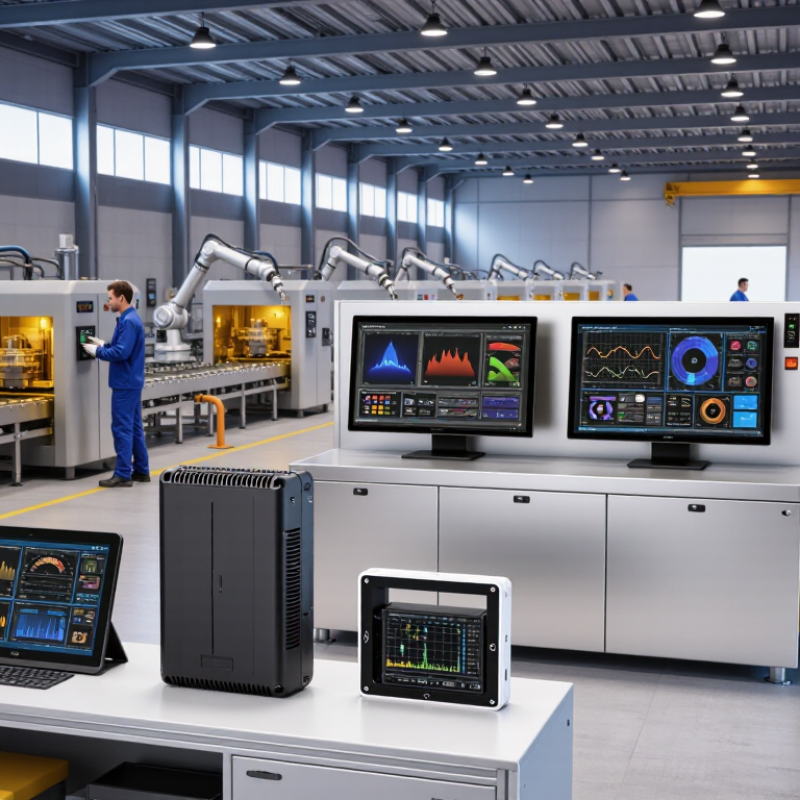
Industrial panel PCs are best classified by form factor, not screen size alone. Common formats include all-in-one touch panels, compact box-panel hybrids, and larger operator stations. A 2024 MarketsandMarkets report estimates the global industrial PC market will grow from about USD 6.5 billion in 2024 to USD 8.9 billion by 2029. This growth reflects demand for rugged computing near machines, not simply larger displays.
Form factor affects airflow, service access, and installation depth. A 10.1-inch panel may suit a narrow control cabinet, while a 21.5-inch unit improves visibility across a production cell. IP codes add another essential layer. Under IEC 60529, IP65 means dust-tight protection and resistance to water jets. IP67 adds temporary immersion protection, but only under defined test conditions.
Do not treat IP67 as permanent submersion capability.
Mounting data should include cutout dimensions, mounting depth, bracket clearance, and panel thickness. VESA compatibility helps with arm or stand installation, while flush mounting supports cleaner hygiene zones. The Industrial Automation Market report from Interact Analysis highlights continuing investment in connected factory equipment, yet real installations remain less tidy than catalogs suggest.
Cable bends get overlooked. Heat also accumulates behind sealed panels.
A neat classification can still mislead. Check the enclosure, not just the label.
Fanless and rugged panel PCs are built for continuous operation in factories, warehouses, and outdoor control cabinets. Their sealed design reduces dust entry and removes a common failure point: the mechanical fan. However, fanless does not mean heat disappears. Engineers must move processor heat through the chassis, mounting frame, and surrounding air.
A reliable 24/7 design begins with measured thermal testing. We check surface temperatures, processor loads, airflow restrictions, and cabinet temperatures under sustained operation. Copper heat paths and aluminum housings can spread heat effectively. Yet poor panel installation may still create hot spots. Small details matter. Cable glands can block vents. Bright sunlight can raise enclosure temperatures sharply.
IEC 60068 test methods help buyers compare environmental resistance. Depending on the application, evaluations may include temperature cycling, damp heat, vibration, shock, and dust exposure. These tests should match real operating conditions, not merely appear in a datasheet. A test result also needs clear limits, sample details, and duration. Otherwise, confidence becomes guesswork. No design is perfect. We have seen stable systems fail after cabinet upgrades reduced internal clearance. Field records, thermal logs, and repeated validation often reveal what laboratory testing misses. Ruggedness is a process, not just a casing feature.
In 2026, hazardous-area panel PCs require more than a bright display and a sealed enclosure. Selection begins with the site’s gas, vapor, or dust risks. Zone 0, 1, and 2 cover gases; Zone 20, 21, and 22 cover combustible dust. The zone indicates how often an explosive atmosphere may exist. It does not automatically identify the correct computer.
ATEX supports equipment use within the European regulatory framework, while IECEx provides an internationally recognized certification system. Buyers should check the exact protection concept, equipment group, temperature class, and ambient temperature range. A device marked for Zone 2 cannot simply be installed in Zone 1. That shortcut creates serious compliance and safety concerns. Check the certificate, not only the product label.
Real projects also depend on installation details. Cable entries, bonding, cooling, touchscreen operation, and cleaning methods can affect the certified system. A stainless-steel enclosure may resist washdown, yet its mounting hardware can become the weak point. Small details matter. In dusty areas, heat buildup and surface temperature deserve close review. In gas areas, an operator may need gloves, so touch sensitivity must be tested on site. Specifications often look complete. They are not always complete. Ask the supplier or certification body to confirm the full assembly, especially after adding peripherals or changing the enclosure. A careful zone assessment, documented by qualified personnel, remains more reliable than assumptions made from a catalog.
Medical and cleanroom panel PCs require more than a bright display and sealed housing. For medical use, IEC 60601-1 guides electrical safety, insulation, leakage current, and mechanical risks. Buyers should verify how the panel PC integrates with the complete medical system. A compliant component does not automatically make the entire system compliant. That detail is often missed.
In cleanrooms, ISO 14644 controls airborne particle concentration and room classification. The panel PC should support smooth, low-shedding surfaces and easy disinfection. Gaps around buttons, mounting edges, and cable entries deserve close inspection. Stainless steel may help, but material choice alone proves little. Request test reports, cleaning compatibility data, ingress protection details, and documented production controls. Ask how the unit performs after repeated wiping cycles.
Tips: Define the room class before selecting hardware. Check the required screen size, glove operation, viewing angle, and mounting method. Confirm electrical safety with a qualified compliance engineer. Test the installed unit, not only the sample. A cleanroom design can still fail because of one exposed connector or poorly sealed bracket. No checklist catches every mistake. Review real installation photos, service procedures, and maintenance access before approving global shipments.
For global buyers, an industrial panel PC should be judged by evidence, not attractive specifications. Match the CPU to the workload: basic HMI tasks need less processing power, while vision inspection and analytics require more cores and thermal headroom. Review sustained performance, not only peak frequency. Some specifications look impressive.
RAM capacity affects application stability, especially when several dashboards, databases, or remote tools run together. Confirm the memory type, maximum upgrade capacity, and operating temperature range. TPM 2.0 should be physically present and enabled in firmware. Ask for its status, security configuration, and support for measured boot. Test it properly.
MTBF figures need careful interpretation. They are estimates based on conditions, not promises of service life. Request the calculation method, operating temperature, duty cycle, and failure assumptions. I have seen high MTBF numbers become less useful when the environment differs sharply from the test model. Product lifecycle data should include processor availability, planned production duration, repair support, firmware updates, and replacement compatibility. A clear last-time-buy process matters. Ask for written records and revision dates. Missing data is also data; it may reveal an immature supply plan. Before approval, run a sample in a dusty, warm cabinet and check touch accuracy, boot recovery, port stability, and maintenance access. Real conditions often expose quiet weaknesses.
| Industrial Panel PC Type | Typical Industrial Use | Typical CPU Class | Typical RAM | TPM 2.0 Requirement | Typical Storage | Display & Touch Options | Typical Protection | Typical MTBF* | Expected Product Lifecycle | Buyer Checklist |
|---|---|---|---|---|---|---|---|---|---|---|
| Compact Fanless Panel PC | Machine control, operator terminals, light industrial HMI | Low-power x86 quad-core or equivalent embedded processor | 8–16 GB DDR4/DDR5 | Recommended; verify firmware-based TPM 2.0 support | 128–512 GB industrial SSD | 10.1–15.6 in; projected-capacitive or resistive touch | Front IP65; optional full enclosure IP65/IP66 | 50,000–70,000 hours, configuration-dependent | 5–7 years; confirm CPU and panel availability | Check mounting cutout, fanless thermal design, touch-glove performance, and DC input range |
| High-Performance Automation Panel PC | SCADA, advanced HMI, machine vision support, industrial analytics | Mobile-class or embedded Core-class processor, 4–12 cores | 16–64 GB DDR4/DDR5 | Required for secure boot, disk encryption, and modern Windows security policies | 256 GB–2 TB industrial NVMe or SATA SSD | 15.6–21.5 in; multi-touch, high-brightness options | Front IP65; optional IP66 enclosure and conformal protection | 40,000–60,000 hours, depending on thermal load | 5–7 years; request a written last-time-buy policy | Verify expansion capability, graphics performance, thermal derating, and long-term OS image support |
| Rugged Outdoor Panel PC | Outdoor kiosks, transport systems, energy sites, roadside equipment | Low-power embedded x86 or ARM processor with extended-temperature rating | 8–32 GB industrial memory | Strongly recommended for remote device authentication and encrypted storage | 128 GB–1 TB industrial SSD; optional removable storage | 10.1–21.5 in; sunlight-readable, anti-glare, optically bonded display | IP65–IP66; optional IP69K front; vibration and shock protection | 50,000–80,000 hours under specified conditions | 5–8 years; display backlight and battery availability are critical | Confirm operating temperature, solar-load testing, surge protection, brightness, and condensation control |
| Stainless-Steel Hygienic Panel PC | Food processing, beverage production, pharmaceutical manufacturing | Low-power fanless x86 or ARM processor | 8–32 GB DDR4/DDR5 | Recommended where network access and regulated data handling require hardware security | 128–512 GB industrial SSD | 10.1–21.5 in; sealed projected-capacitive touch | IP65–IP69K; stainless-steel enclosure; hygienic cable routing | 50,000–70,000 hours, depending on washdown and temperature | 5–8 years; retain identical mechanical dimensions for replacement | Check chemical resistance, washdown pressure, stainless-steel grade, gasket design, and hygienic certification needs |
| Vehicle-Mount Panel PC | Warehouse vehicles, fleet terminals, logistics, mobile material handling | Low-power embedded x86 or ARM processor with power-management support | 4–16 GB industrial memory | Recommended for user authentication and encrypted local data | 64–512 GB industrial SSD or eMMC | 7–15.6 in; glove-friendly touch and physical function keys | IP54–IP65; vibration, shock, and wide DC input protection | 40,000–60,000 hours under mobile-equipment conditions | 5–7 years; battery, vehicle dock, and mounting parts need lifecycle support | Verify vibration standards, ignition control, wireless options, docking reliability, and battery backup behavior |
| Marine and Heavy-Industry Panel PC | Marine control rooms, mining, steel plants, heavy machinery | Embedded x86 processor with extended-temperature and vibration support | 8–32 GB industrial memory | Recommended; required by many modern cybersecurity architectures | 128 GB–1 TB industrial SSD with power-loss protection preferred | 12.1–24 in; anti-glare, high-brightness, resistive or projected-capacitive touch | IP65 front; optional IP66 enclosure; corrosion and vibration protection | 50,000–80,000 hours, subject to installation environment | 7–10 years for engineered projects; obtain formal change-notification terms | Check marine or industrial certification scope, galvanic corrosion protection, shock testing, and spare-unit strategy |
| Medical-Grade Panel PC | Medical carts, diagnostic equipment interfaces, clinical information terminals | Low-power x86 or ARM processor selected for low heat and stable operation | 8–32 GB ECC or non-ECC industrial memory, according to platform | Recommended for secure boot, encryption, and controlled device access | 128–1,024 GB industrial SSD with secure-erase support | 12.1–24 in; low-reflection, easy-clean, sealed touch surface | Front IP65; fanless design; medical power and leakage requirements may apply | 50,000–70,000 hours, excluding separate display-life specifications | 7–10 years for validated equipment platforms | Confirm applicable medical electrical safety, EMC, cleaning-agent resistance, software validation, and service documentation |
Classify them by form factor, not screen size alone. Common types include all-in-one panels, box-panel hybrids, and operator stations. Form factor affects airflow, service access, and installation depth. A larger screen is not always better.
Request cutout dimensions, mounting depth, bracket clearance, and supported panel thickness. Check VESA compatibility for arms or stands. Flush mounting can support cleaner production areas. Also inspect cable bends behind the panel.
IP65 indicates dust-tight protection and resistance to water jets under defined test conditions. It does not prove protection against immersion. Test conditions matter.
No. IP67 covers temporary immersion under specified conditions. It does not mean permanent submersion is safe. Review the complete enclosure and installation method.
Begin with the site risk and zone classification. Gas zones include 0, 1, and 2. Dust zones include 20, 21, and 22. Check the exact certificate, protection concept, temperature class, and ambient range.
No. Approval for Zone 2 does not automatically cover Zone 1. Confirm the certificate and complete assembly before installation. Do not rely on the label alone.
Review cable entries, bonding, cooling, touchscreen use, and cleaning methods. Gloves may reduce touch sensitivity. Dust can increase heat buildup and surface temperature. Small details become large problems.
Medical systems should consider IEC 60601-1 and complete-system integration. Cleanrooms should follow ISO 14644 requirements. Inspect surfaces, buttons, mounting edges, connectors, and cable entries. Test repeated disinfection, glove operation, viewing angle, and maintenance access. A compliant sample may still fail after installation.
Choosing the right Industrial Panel PC requires more than comparing screen size or processing speed. Global buyers should first evaluate form factor, IP code, and mounting method according to installation conditions. Fanless and rugged models are suitable for continuous operation when their thermal design and IEC 60068 environmental test performance match the site. For hazardous areas, selection should be based on the applicable ATEX or IECEx requirements and the equipment’s certified zone suitability. Medical and cleanroom applications also demand careful review of IEC 60601-1 safety considerations and ISO 14644 contamination-control expectations.
A practical purchasing checklist should cover CPU performance, RAM capacity, TPM 2.0 support, storage reliability, MTBF information, operating temperature, and maintenance access. Buyers should also confirm product lifecycle policies, software compatibility, customization options, warranty terms, and long-term spare-part availability. By matching technical specifications with environmental, safety, and lifecycle requirements, organizations can select a dependable Industrial Panel PC that supports stable 24/7 operation and future system upgrades.